logo
Get Your .com Domain Today

US$ 9.99

Looking for a new domain name? Try domain checker

Technology Overview

Transfer a domain name in 4 simple steps:

image
Step 01
Enter the domain name you want to transfer

Simply enter your domain name and click on transfer.

  • Domain Name: Enter the full domain name you wish to transfer.
  • Domain Unlock: Make sure your domain is unlocked before initiating the transfer.
image
Step 02
Prepare domain for transfer

Unlock the domain you want to transfer at your current registrar.

  • Unlock Your Domain: Go to your current registrar’s dashboard and unlock the domain you wish to transfer.
  • Verify Domain Status: Ensure the domain is eligible for transfer and not under a 60-day lock period.
image
Step 03
Proceed with the purchase

Enter the EPP code or domain transfer authorization code and confirm transfer.
  • Enter EPP Code: Provide the domain’s EPP or authorization code obtained from your current registrar.
  • Confirm Transfer: Review the details and proceed to complete the domain transfer process.
image
Step 04
Confirm domain transfer email

You will receive a confirmation letter from your domain registry.
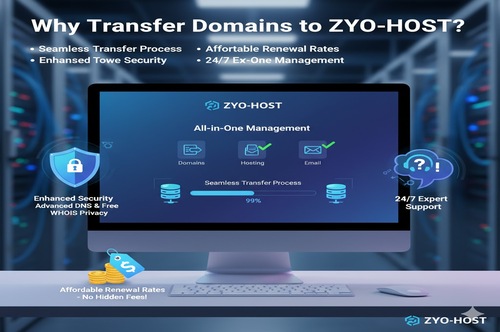
  • Check Your Email: Look for the domain transfer confirmation email from your domain registry.
  • Approve the Transfer: Follow the instructions in the email to confirm and complete the transfer process.
Technology Overview

Why Transfer Domains to ZYO-HOST

  • Seamless Transfer Process: Move your domains effortlessly with step-by-step guidance and instant updates.
  • Affordable Renewal Rates: Enjoy transparent pricing with no hidden fees or surprises.
  • Enhanced Security: Protect your domain with advanced DNS management and free WHOIS privacy protection.
  • 24/7 Expert Support: Get help anytime from our dedicated hosting and domain experts.
  • All-in-One Management: Manage all your domains, hosting, and emails from one simple dashboard.
View All
image
image
No time lost

Most domain transfers include a 1 year renewal to your domain's current expiration date.

image
Easy domain management

Zyo-Host offers a wide variety of tools to satisfy advanced user and website developer needs, all in one place.

image
Free privacy protection

Free WHOIS privacy protection is included with every eligible domain registration.

DOMAIN PRICES

Check our domain transfer prices

Domains
Transfer
Renewal

.com

$9.99

$17.99/year

.fr

$7.99

$10.99/year

.in

$6.99

$9.99/year

.org

$12.99

$15.99/year

.nl

$0.99

$9.99/year

.net

$14.99

$17.99/year

.lt

$10.99

$11.99/year

.es

$0.99

$9.99/year

.de

$4.99

$13.99/year

.eu

$6.99

$7.99/year

Categories
FAQ

Domain Registration FAQ’s

The best thing we love about Hostcity is it does two-way sync with Google us to better organize & keep everything on track.


Web hosting is a service that brings your site online by storing your website's files, such as photos, videos, and text, on a web server. Simply put, it is necessary to purchase it for launching and operating your site. To ensure your site stays online and receives timely support, select a reliable web hosting provider that caters to your website needs best. The most popular hosting options for both personal or business use include: Shared hosting. A single shared server hosts multiple websites, allocating each with a specific amount of storage space and resources. Usually, beginners and bloggers opt for this option due to its affordability. WordPress hosting. Similar to shared hosting, many users use one server. However, a managed WordPress host offers more tools and features for WordPress website optimisation, including its speed, performance, and maintenance. VPS hosting. This web hosting service divides a physical server into multiple virtual machines, providing each user with dedicated resources and complete root access. Virtual private server (VPS) plans are more suited to tech-savvy users who require additional power and control. Cloud hosting. With cloud plans, websites operate on multiple virtual servers, minimizing potential downtime and hardware issues. As a result, these web hosting services are perfect for ensuring stable website uptime and performance, especially for freelance web developers managing numerous clients. Also, make sure to verify if your selected web host offers a website builder or supports your preferred content management system (CMS). This will simplify the process of creating your website. With Hostinger, you can enjoy the website builder, 1-click WordPress installer, and high-speed hosting with a 99.9% uptime guarantee – all at an unbeatable price. Begin with shared web hosting and upgrade to cloud plans for more power, or opt for VPS plans when you're ready for a customised solution. Not sure which plan is right for you? Take a look at our detailed tutorial on how to choose a hosting plan to make an informed decision..

Getting a plan with Hostinger is incredibly easy. Just scroll up to the pricing table, select one of the web hosting packages, and click on the Add to Cart button. Once you’re on the checkout page, choose a subscription period. Although monthly payments are an option, we suggest opting for longer plans as they provide more value for your money. Next, sign up or sign in to your Hostinger account and choose a payment method. Add your personal details and click the Submit Secure Payment button to complete the registration process. Once you finish the payment process, you will receive login credentials to access your account. From there, you can manage websites, domains, databases, email accounts, files, and more.

Hostinger is one of the few web hosting providers that offer round-the-clock multilingual support. You will receive any help you need – Our Customer Success team is made up of experts who are ready to go the extra mile to resolve your concerns. So, feel free to contact us through live chat if you need any assistance. Moreover, we have a comprehensive Hostinger Tutorials database covering website troubleshooting, search engine optimisation, the best digital marketing practices, and more. Additionally, have a look at Hostinger Academy YouTube channel for easy-to-follow video tutorials.

With the exception of the Single plan, all Hostinger’s web hosting options include a free domain when you buy a plan that is longer than a year. If you already have a domain from another registrar, simply point it to Hostinger nameservers. Managing your website and troubleshooting issues will be easier when you keep your hosting account and domain with a single web hosting company.